Enrollment and Scheduling
Changing Your Course Start Date or Schedule
Selecting Course Start Dates
Guild - Dropping Your Program
Video - Selecting Course Start Dates
Retake Policy
Start Dates Showing "??"
Schedule Customization and Course Pacing
Prerequisites for eCornell Courses
Do I Have To Select Start Dates For All Of My Courses?
Guild Enrollment Information
Pay As You Go - Course Scheduling
Single-Course Enrollment
Registering For A Course Or Program
Finding Your Start Date
Organizational Partner Drop/Transfer Policy
Video - How To Change Your Course Start Dates
Viewing Your Schedule
Certificate 2-year Expiration
eCornell Course Length
Finding Dates to Retake a Course
Course Navigation
Getting Started at eCornell
Logging In to Your Course
Messaging Your Course Facilitator
Finding Your Course Transcript/Printable Course
Extension Policy
What To Do If You Don't Pass a Course
Locating Your Course Syllabus
Difficulty Accessing Course Materials in China
Best Practices for eCornell Students
Creating a Response in a Discussion Forum
Course Structure And When To Be Online
Converting a Google Docs File to Another Format for Submission
Marriott SSO Login Instructions
AI FAQ
Completing your Course Project
Use of AI in Courses and Student Work
Translating Captions and Audio in Course Content Videos
Understanding Your Grade Book
Research Paper Review
Cannot Access "Take me to my courses"
Navigating The Learning Environment (Canvas)
Sharing eCornell Content/Resources
Confirming You Have Completed All Course Requirements
Creating A Video Response In A Discussion
Download Your Completed Course Project
Accessing Your Live Session
New Student Orientation
Adding An Image to a Discussion Post
Required Materials for HAME507 and HAME508
No Courses On Your Dashboard
Course Access After The End Of Instruction
Account Management
Updating Your Profile or Display Name
Resetting Your Password
Password And Username Guidelines
Cleaning Up Your Canvas Inbox
Change The Language for Your Course Environment in Canvas
eCornell Plagiarism Policy
eCornell Code of Conduct
Accessibility Accommodations
Adjusting Your Notification Settings
How to Whitelist Email Domains to Ensure Course Access and Notifications
Cornell University NetID and .edu Email Address Eligibility
Glossary Of Terms
Sync Course Calendar With Google Calendar
Sync Course Calendar With Outlook Calendar
Records and Completion
Video - Downloading Your Student Record / Transcript
US Authentications Services
PDU Category for PMI Recertification
Downloading Your Student Transcript
Grading Scheme
Leverage Your Credential
Filling out your In-School Deferment Request form (OMB No. 1845-0011)
Locating An Old Credential
Tracking Your Program Progress
Video - How To Download Your Certificate
Request official verification of your CEUs
Ordering a Hard Copy of Your Certificate or Credential
Sharing Your Credential
Does the Certificate Say eCornell or Cornell University?
Tuition And Tax Credits
Trouble Downloading Your Certificate/Credential
Finding a Copy of Your Receipt
Locating HRCI codes, PMI codes, SHRM codes, and CEUs
Downloading / Printing Your Credential
Certificate Authentication
Downloading Your Confirmation of Completion Letter
Why am I seeing different grading types on my transcript?
Recommendation Letter / Reference
Continuing Education Units (CEU)
Academic Credit For eCornell Courses
Certificate vs Certification
Editing Your Name On Your Record
Video - How To Download Your Confirmation of Completion Letters
1098-T Form
Troubleshooting
Alternatives to Microsoft Office to Complete Coursework
Clearing Your Browser's Cache
Login Issues / Trouble With Username and/or Password
Using a Tablet or Mobile Device
Live Session Troubleshooting Guide
Technical Requirements For eCornell Courses
"Entity Not Found" Error Message
Course Content Not Loading - Troubleshooting
Mac Users - Converting a Pages File to Another Format for Submission
Help With Technical Issues
Trouble Logging in to your eCornell Account
Trouble With Course Poll or Survey
On-Demand
On-Demand Student Transcript
Browsing On-Demand Lesson Library
On-Demand Credential Eligibility
On-Demand Lessons Not Showing as Complete
Accessing On-Demand Lessons
On-Demand Lesson Length of Access
Saving Your Place in On-Demand Courses
Cornell Staff/Student: Starting On-Demand Courses With Your Cornell NetID
Keynotes
Keynotes: Will you share documents shown in the Keynote?
Keynotes: Will I be able to earn CEUs?
Keynotes: Is this event free?
Keynotes: Trouble Registering For a Live Event
Keynotes: Unsubscribe From Mailing List
Keynotes: Will this event be recorded?
Special Programs
Accessing Your eCornell Workshop
Produce Safety Alliance Grower Training: Frequently Asked Questions
Q & A for Bank of America's 'Women's Entrepreneurship' students
Guild Student Attestation
PHR Prep Course Requirements
eCornell Workshops- Frequently Asked Questions
Q & A for Master Beekeeping Students
Q & A For Professional Mediation Students
Signing Up for Workshops using Your All-Access Pass
What is a Symposium?
- Browse Categories
- Special Programs
- Accessing Your eCornell Workshop
Accessing Your eCornell Workshop

How to Access Your Workshop
eCornell Workshops are accessed through Canvas.
After enrolling, you will receive an email containing a direct link to your Workshop course. This link will take you to Canvas at learn.ecornell.cornell.edu.
On the day of your eCornell Workshop, log in to Canvas and open your Workshop from your dashboard. You should see a tile with the title of your Workshop, click that to view the full page with links.
The live Zoom link is located on the course homepage. Click the red "Join Session" button located under the title banner.
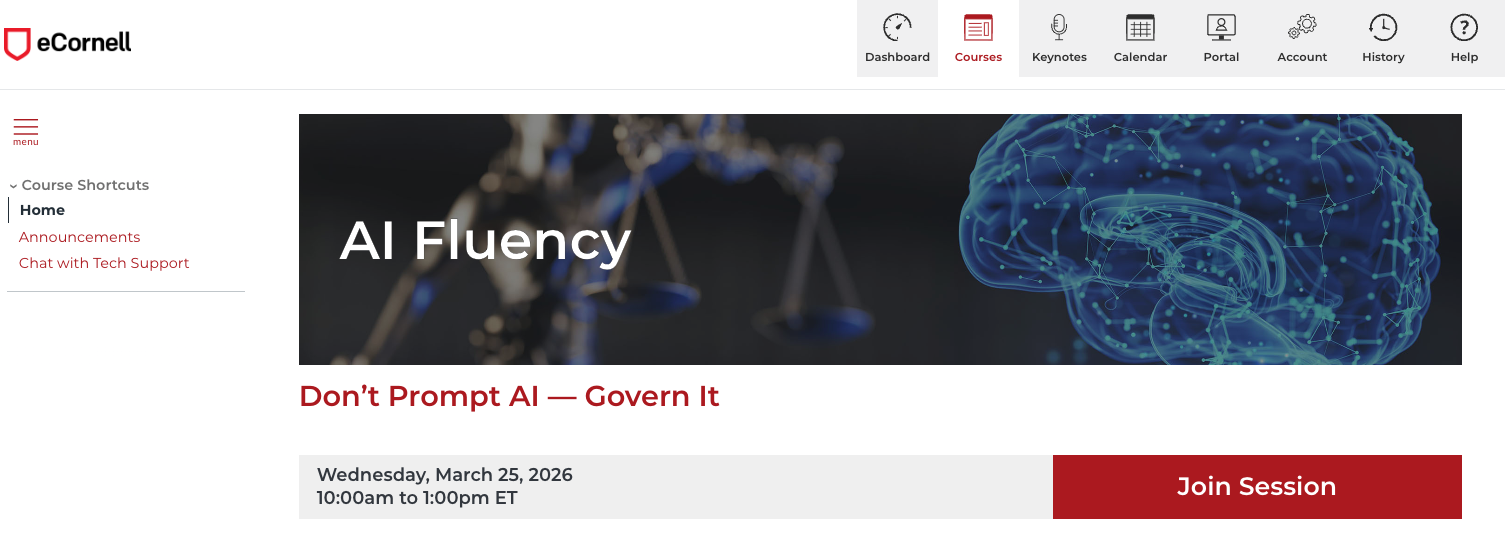
Workshops begin promptly at the scheduled time. We recommend logging in five to ten minutes early to ensure you are ready to join.
I did not receive an email with my course information, where do I find that?
Technical Requirements
You will join the live session using the Zoom link provided inside your Workshop course. Please ensure that your speakers and microphones are working prior to the start of your Workshop.
If your specific Workshop requires additional tools or setup, instructions will be provided within the Workshop.
Please make sure pop-ups are enabled in your browser so the workshop can open properly. If pop-ups are blocked, you may have trouble accessing the workshop.